Beginner Drone Pilots
Our community blogs
-
SkyPilot's Blog
A blog by SkyPilot in Beginner Drone Pilots- 3 Entries
- 0 Comments
- 1098 Views
A personal beginner drone journey sharing first flights, mistakes, lessons learned, and what I wish I knew before becoming a drone pilot to help new flyers start right.
```htmlDrone interference represents one of the most critical challenges facing both recreational FPV pilots and commercial operators in today's increasingly congested electromagnetic spectrum. As the skies fill with more unmanned aircraft systems and our environment becomes saturated with wireless devices, understanding and managing drone interference has become essential for safe, legal, and successful flight operations.
Signal interference can transform a routine flight into a dangerous situation within seconds, potentially causing crashes, flyaways, or worse?collisions with manned aircraft. This comprehensive guide explores the technical aspects of drone signal loss, regulatory requirements, and proven strategies for maintaining reliable communication links in challenging RF environments.
What Is Drone Interference and Why It Matters
Definition of Drone Signal Interference
Drone interference occurs when unwanted electromagnetic signals disrupt the communication between a drone and its operator, affecting either the control link, video transmission, or GPS reception. This drone interference can manifest as degraded signal quality, complete signal loss, or erratic behavior in flight control systems.
The phenomenon encompasses several types of signal disruption:
- Control link interference affecting flight commands
- Video transmission degradation impacting FPV operations
- GPS signal jamming disrupting navigation systems
- Telemetry data corruption affecting flight parameters
Types of Interference: Signal Loss vs Signal Disruption
Understanding the distinction between complete drone signal loss and partial signal disruption is crucial for proper response protocols. Signal loss represents a complete communication breakdown, while signal disruption involves degraded performance that may still allow limited control.
Complete signal loss typically triggers fail-safe modes such as return-to-home (RTH) or controlled landing sequences. Signal disruption, however, may cause erratic behavior, reduced range, or intermittent control responses that can be equally dangerous if not properly managed.
Safety Risks and Potential Consequences
The safety implications of drone interference extend far beyond equipment damage. Uncontrolled aircraft pose risks to people, property, and other aircraft. In congested airspace, interference-induced flight path deviations can create collision hazards with manned aviation.
Common consequences include:
- Loss of situational awareness for the pilot
- Uncontrolled descent or flyaway events
- Collisions with obstacles or other aircraft
- Emergency landing in populated areas
- Regulatory violations and potential enforcement action
Legal Implications Under FAA Regulations
The Federal Aviation Administration takes drone interference seriously, particularly when it affects aviation safety or violates controlled airspace. Operators must understand their legal obligations regarding interference prevention and reporting requirements under current regulations.
FAA drone interference rules require pilots to maintain positive control of their aircraft at all times and operate in a manner that does not interfere with other aircraft operations. Violations can result in civil penalties, certificate actions, or criminal charges in severe cases.
Common Causes of Drone Signal Interference
Radio Frequency Congestion (2.4GHz and 5.8GHz Bands)
The most prevalent source of drone frequency issues stems from overcrowded ISM bands used by consumer electronics. The 2.4GHz band, shared with Wi-Fi, Bluetooth, and microwave ovens, experiences significant congestion in urban environments.
2.4GHz interference commonly affects control links, while 5.8GHz drone problems typically impact FPV video transmission. Both frequencies suffer from increasing congestion as more devices compete for limited spectrum space.
Key sources of RF interference include:
- Wi-Fi routers and access points
- Bluetooth devices and wireless peripherals
- Other drone operations in the vicinity
- Industrial, scientific, and medical equipment
- Cellular network infrastructure
Electromagnetic Interference from Power Lines and Electronics
Electromagnetic interference drones encounter near power infrastructure represents a significant operational hazard. High-voltage transmission lines generate powerful electromagnetic fields that can overwhelm sensitive receiver circuits and cause erratic flight behavior.
Electrical substations, transmission towers, and industrial facilities create complex electromagnetic environments that can disrupt multiple frequency bands simultaneously. This RF interference drones experience near power infrastructure often requires significant separation distances for safe operation.
Physical Obstacles: Buildings, Terrain, and Weather Conditions
Physical barriers contribute to signal degradation through reflection, absorption, and multipath effects. Dense urban environments create challenging conditions for maintaining reliable communication links, particularly for low-power FPV systems.
Terrain features, vegetation, and atmospheric conditions all influence signal propagation characteristics. Understanding these environmental factors helps operators predict potential interference issues and plan flight paths accordingly.
GPS Jamming and Disruption
GPS interference drones face can originate from intentional jamming devices or unintentional electronic emissions. GPS disruption affects critical navigation functions, including position holding, waypoint navigation, and return-to-home operations.
Military facilities, airports, and certain industrial operations may generate GPS interference as part of their normal operations. Pilots must be prepared for GPS-denied environments and understand backup navigation procedures.
Device Conflicts: Wi-Fi, Smartphones, and Other Drones
Modern flight environments often involve multiple electronic devices operating simultaneously. Smartphones, tablets, laptops, and other drones can create complex interference patterns that affect flight operations.
Multi-pilot operations require careful frequency coordination to prevent mutual interference. Even seemingly unrelated devices can create problems if they operate on conflicting frequencies or generate spurious emissions.
Environmental Factors Affecting Drone Signals
Urban vs Rural Flying Environments
The electromagnetic environment varies dramatically between urban and rural locations. Cities present dense RF congestion from multiple sources, while rural areas may offer cleaner spectrum but present other challenges such as terrain masking and distance limitations.
Urban drone interference typically involves multiple simultaneous sources requiring sophisticated mitigation strategies. Rural operations may encounter different challenges, including atmospheric effects and terrain masking that can cause unexpected signal loss.
Weather Conditions and Atmospheric Interference
Atmospheric conditions significantly influence radio wave propagation, particularly at higher frequencies used for FPV video transmission. Humidity, precipitation, and temperature inversions can create signal fading or enhancement effects that impact flight operations.
Precipitation static, temperature gradients, and atmospheric ducting can cause unpredictable signal behavior. Professional operators must consider meteorological factors when planning operations in challenging environments.
High-Voltage Power Lines and Electromagnetic Fields
Power transmission infrastructure creates intense electromagnetic fields that can overwhelm drone electronics. Corona discharge from high-voltage lines generates broadband interference across multiple frequency bands.
Safe separation distances from power lines serve dual purposes: preventing physical collision and avoiding electromagnetic interference. The required separation distance increases with voltage levels and atmospheric conditions.
Metal Structures and Signal Reflection/Absorption
Large metal structures create complex RF environments through reflection and absorption effects. These structures can cause signal shadowing, multipath propagation, and frequency-selective fading that affects different systems differently.
Buildings, bridges, towers, and industrial structures all present unique challenges for maintaining reliable communication links. Understanding these effects helps operators plan appropriate flight paths and operating procedures.
FPV Drone Signal Loss and Interference Solutions
Frequency Band Selection (2.4GHz vs 5.8GHz)
FPV interference management begins with proper frequency selection based on operational requirements and environmental conditions. Each frequency band offers distinct advantages and limitations that must be considered during system planning.
The 2.4GHz band provides better obstacle penetration and longer range but suffers from higher congestion levels. The 5.8GHz band offers more available channels and less congestion but has reduced range and obstacle penetration capabilities.
Key considerations for frequency selection include:
- Local spectrum congestion levels
- Required operating range and obstacle penetration
- Available channel options and coordination requirements
- Equipment compatibility and performance characteristics
Channel Management and Avoiding Overlap
Proper channel management prevents mutual interference between multiple drone operations. Understanding channel spacing requirements and potential overlap issues helps maintain clean communication links in multi-aircraft environments.
Channel coordination becomes critical during group flights or operations near other drone activities. Establishing clear communication protocols and frequency management procedures prevents interference-related accidents.
Antenna Positioning and Quality Considerations
Antenna selection and positioning significantly impact signal quality and interference susceptibility. High-quality antennas with appropriate gain patterns and polarization characteristics improve signal-to-noise ratios and reduce interference susceptibility.
Proper antenna installation includes consideration of mounting location, orientation, and protection from physical damage. Circular polarization often provides better performance in multipath environments common in urban operations.
VTX Signal Optimization Techniques
VTX signal problems can often be resolved through proper transmitter configuration and optimization. Power level adjustment, channel selection, and antenna matching all contribute to reliable video transmission performance.
Video transmitter optimization involves balancing transmission power, heat generation, and interference potential. Higher power levels may overcome some interference but can create problems for nearby operations.
FAA Regulations and Interference Reporting
Current FAA Rules on Interference and Aviation Safety
The FAA's approach to drone interference focuses on maintaining aviation safety while enabling legitimate drone operations. Current regulations require operators to maintain positive aircraft control and avoid interference with manned aviation.
FAA drone interference rules encompass several key areas:
- Positive control requirements throughout flight operations
- Immediate notification of interference affecting manned aircraft
- Equipment standards and certification requirements
- Operating limitations in high-interference environments
Reporting Unsafe Drone Operations to Flight Standards District Offices
When interference incidents occur, proper reporting procedures help the FAA identify systemic problems and develop appropriate responses. Flight Standards District Offices (FSDOs) serve as the primary contact point for interference-related reports.
Required information for interference reports includes location details, time and duration of interference, affected aircraft or systems, and any safety impacts observed. Accurate reporting helps build the database needed for regulatory improvements.
Penalties and Enforcement Actions for Interference Violations
FAA enforcement actions for interference violations can include civil penalties, certificate revocation, or criminal referrals depending on the severity and circumstances involved. Understanding potential penalties emphasizes the importance of compliance.
Enforcement factors include the degree of safety impact, operator knowledge and intent, compliance history, and cooperation with investigations. Preventive measures and voluntary compliance programs may reduce enforcement exposure.
Part 107 Requirements and Interference Prevention
Part 107 operations must incorporate interference prevention into their standard operating procedures. This includes equipment maintenance, pre-flight checks, and contingency planning for interference events.
Commercial operators often face higher scrutiny regarding interference prevention due to their professional status and potential impact on aviation safety. Documentation and training requirements reflect this increased responsibility.
Prevention Strategies and Best Practices
Pre-flight Interference Checks and Equipment Testing
Comprehensive pre-flight procedures should include systematic interference assessment and equipment verification. This process helps identify potential problems before they affect flight safety.
Effective pre-flight checks include:
- Spectrum analysis of the operating environment
- Range and signal quality testing
- Fail-safe function verification
- GPS signal strength and accuracy assessment
- Emergency procedure review and preparation
Proper Antenna Selection and Signal Boosters
High-quality antennas and signal enhancement equipment can significantly improve interference resistance. Professional-grade components often provide better performance and reliability than consumer-oriented alternatives.
Signal booster selection must consider regulatory compliance, heat generation, and potential interference to other operations. Proper installation and configuration maximize benefits while minimizing negative impacts.
Frequency Management and Channel Selection
Proactive frequency management involves ongoing monitoring of the RF environment and adaptive channel selection based on current conditions. This approach helps maintain optimal performance as conditions change.
Dynamic frequency selection capabilities allow systems to automatically avoid interference sources. However, manual oversight remains essential to ensure appropriate system behavior and regulatory compliance.
Flying Techniques for High-Interference Environments
Operational techniques can mitigate interference effects through flight path planning, altitude selection, and positioning strategies. Understanding interference patterns helps pilots avoid problematic areas.
Techniques for high-interference environments include:
- Maintaining line-of-sight when possible
- Using terrain masking to avoid interference sources
- Planning alternate flight paths and emergency landing sites
- Coordinating with other operators to minimize mutual interference
Firmware Updates and Equipment Maintenance
Regular firmware updates and equipment maintenance help ensure optimal interference resistance and system reliability. Manufacturers often release updates that improve interference handling and add new capabilities.
Maintenance schedules should include antenna inspection, connection verification, and performance testing. Documentation of maintenance activities supports regulatory compliance and troubleshooting efforts.
Troubleshooting Signal Problems During Flight
Identifying Interference Symptoms in Real-Time
Recognizing interference symptoms during flight enables prompt corrective action before complete signal loss occurs. Common symptoms include video breakup, reduced control responsiveness, and telemetry data errors.
Training pilots to recognize early interference warning signs helps prevent accidents and equipment loss. Regular practice with interference scenarios builds the skills needed for effective real-time decision making.
Emergency Procedures for Signal Loss
When complete drone signal loss occurs, predetermined emergency procedures become critical for safe aircraft recovery. These procedures should be thoroughly practiced and readily executable under stress.
Emergency response priorities include:
- Immediate notification of nearby aircraft if applicable
- Activation of appropriate fail-safe modes
- Movement to areas with better signal reception
- Preparation for emergency landing if necessary
Return-to-Home (RTH) vs Hover Mode Settings
Proper fail-safe configuration determines aircraft behavior during signal loss events. RTH modes attempt to return the aircraft to a predetermined location, while hover modes maintain position until signal recovery.
The choice between RTH and hover modes depends on operational environment, obstacles, and emergency landing site availability. Both modes have advantages and limitations that must be considered during mission planning.
Recovery Techniques for Lost Connections
Signal recovery techniques include repositioning the pilot, switching to alternate control methods, and coordinating with other operators for assistance. These techniques require practice and preparation for effective implementation.
Recovery success depends on understanding interference sources, having backup communication methods, and maintaining calm decision-making under pressure. Regular training exercises help develop these critical skills.
Advanced Solutions and Future Technologies
Adaptive Frequency Switching and Spectrum Management
Advanced systems incorporate adaptive frequency switching capabilities that automatically select optimal channels based on current interference conditions. These systems continuously monitor spectrum conditions and adjust parameters for optimal performance.
Cognitive
Recent Entries
-
New Drone Guy
A blog by New_Drone_Guy in Beginner Drone Pilots- 1 Entry
- 0 Comments
- 1016 Views
New Drone Guy is a beginner drone pilot sharing first flights, lessons learned, gear discoveries, and simple tips to help new flyers start their drone journey with confidence.
Latest entry by New_Drone_Guy,
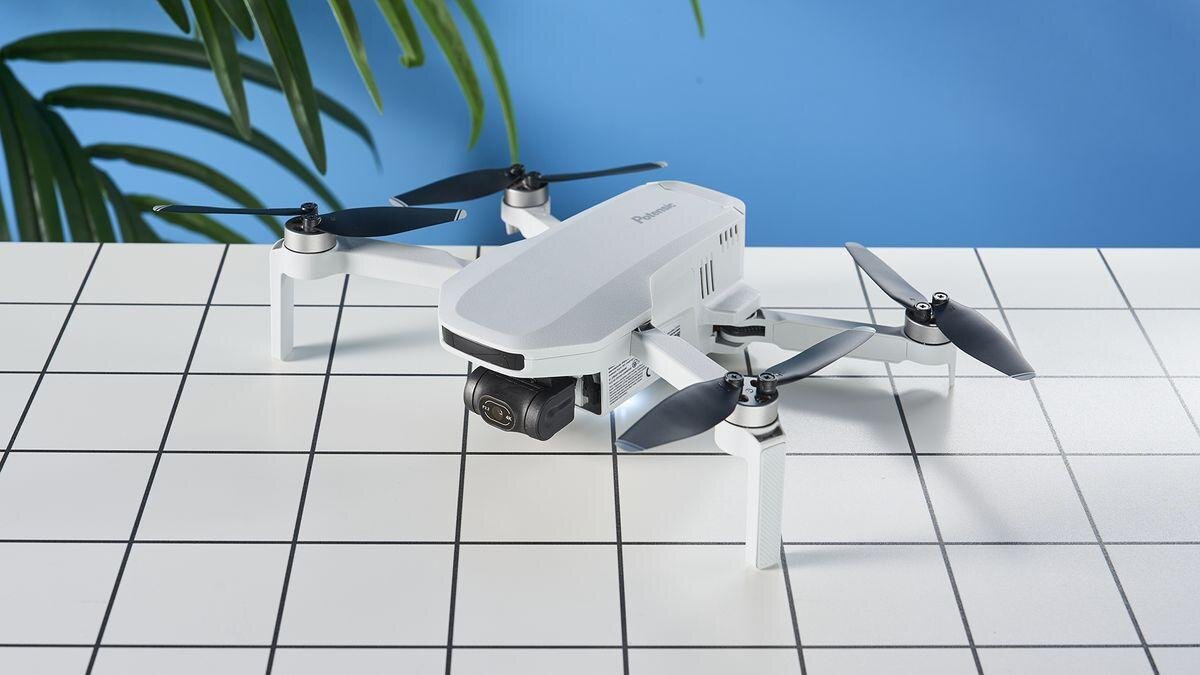
Is the?Potensic Atom?a Good First Drone? A New Pilot?s Honest Guide
Choosing your first drone can feel overwhelming?especially when you?re trying to balance price, features, and ease of use. The Potensic Atom (and its newer sibling, the Atom 2) has quickly become one of the most talked?about beginner drones thanks to its low cost, lightweight design, and surprisingly strong camera performance. But is it really the right choice for a brand?new pilot?
Let?s break down the real pros and cons so you can make a confident decision.
?
???Why the?Potensic Atom?Appeals to First?Time Pilots
1. It?s Lightweight and Doesn?t Require Registration (Recreational Use)
At?249g, the?Atom?and?Atom 2?fall under the FAA?s sub?250g category, meaning recreational flyers don?t need to register it. This makes it a stress?free entry point for new pilots.
2. Surprisingly High?Quality Camera for the Price
The Atom shoots?4K/30fps video?and?12MP stills, while the Atom 2 bumps up to?48MP photos?and?4K HDR video.
Reviewers consistently note that the image quality is?better than expected?for a budget drone.
This makes it a great starter drone for anyone wanting to capture travel footage, real estate shots, or hobbyist aerial photography.
3. Easy to Fly, Even for Total Beginners
Multiple reviewers highlight how simple the Atom is to control.
Stable flight
Beginner?friendly app
QuickShot modes for automated cinematic moves
Compact and portable design
Tom?s Guide even calls it ?a fantastic entry?level drone? very easy to fly.?
4. Excellent Value Compared to DJI
The Atom sits between the DJI Mini 2 SE and Mini 3 in terms of features?but at a much lower price point. TechRadar notes that it offers performance ?more commonly associated with pricier models.?
For new pilots who don?t want to spend $500?$800 on their first drone, this is a major win.
?
???Where the?Potensic Atom?Falls Short for New Pilots
No drone is perfect?especially at this price point. Here are the drawbacks you should know before buying.
1. No Obstacle Avoidance
This is the biggest downside for beginners.
No forward, backward, or downward sensors
You must rely entirely on your own awareness
Both TechRadar and Tom?s Guide list this as a major con.
If you?re nervous about crashing, this is something to consider.
2. Build Quality Is ?Just Passable?
Reviewers mention that the drone feels less durable than DJI models.
Not flimsy, but not rugged
Not ideal for flying in windy or rough conditions
Tom?s Guide specifically calls out the build quality as ?only just passable.?
3. Limited Ecosystem and Software Support
If you plan to grow into commercial flying, the Atom may hold you back.
No integration with AirData or professional logging tools
Fewer accessories and third?party add?ons
Less robust customer support compared to DJI
The Drone Girl review notes that commercial pilots should skip it for this reason.
4. Narrow Field of View (FOV)
The Atom?s camera has a narrower FOV than many competitors, which can make footage feel less cinematic.
5. No Collision Avoidance + Fixed Focus (Original Atom)
The original Atom uses a fixed?focus lens, which means:
Close subjects look sharper
Distant subjects may appear softer
TechRadar highlights this as a limitation.
?
???Quick Comparison: Potensic Atom vs. Atom 2 for Beginners
Feature
Weight
249g
249g
Photo Resolution
12MP
48MP
Video
4K/30fps
4K/30fps HDR
Flight Time
~25 min
25?27 min
Obstacle Avoidance
None
None
Price Range
$129?$276
$300?$520
Best For
Budget beginners
Beginners wanting better camera quality
?
?
???Should a New Pilot Buy the?Potensic Atom?
YES - if you want:
An affordable, easy?to?fly first drone
Good 4K video without spending DJI money
A lightweight drone that avoids FAA registration
A simple, beginner?friendly flying experience
NO - if you want:
Obstacle avoidance for safer flying
Professional?grade reliability
A drone for commercial work
The durability and ecosystem of DJI
?
???Final Verdict
The?Potensic Atom?is?one of the best beginner drones available today?for anyone who wants to learn to fly without a big financial commitment. It delivers impressive camera quality, stable flight, and excellent value. However, new pilots who want the safest possible flying experience?or who plan to grow into commercial drone work?may outgrow it quickly.
If you?re a brand?new recreational pilot looking for your first drone, the?Potensic Atom?is absolutely worth considering.